How to track AI citations without a paid tool
To track AI citations without a paid tool, ask ChatGPT, Claude, Gemini, Perplexity, and Google’s AI Overviews the same 15 to 30 questions. Log the sites each answer cites. Your citation rate is the share of answers that cite your site, for each AI tool.
Ask each question at least three times in ChatGPT, Claude, Gemini, and AI Overviews. In our data, one answer showed only 29% to 57% of the sites each tool cites for that question. Perplexity gives almost the same sources every time, so asking once is enough. Repeat the check weekly for a month, then monthly.
What does AI citation tracking measure?
AI citation tracking measures how often AI tools link to your pages as sources when they answer the questions your buyers ask. An AI answer can include you in four different ways, and only one of them is a citation:
- Citation: the answer links one of your pages as a source. This is what citation tracking counts.
- Mention: the answer names your brand but doesn’t link your site.
- Recommendation: the answer names you as an option to pick, such as one of the tools in a “best tools” answer. It can come with or without a link.
- Visit: a reader clicks through to your site. Visits show up in your analytics, not in the answer.
Citation rate is the share of answers that cite your site: if you ask ChatGPT your questions 30 times in total and 6 of its answers cite you, your rate in ChatGPT is 20%. The formula is: citation rate = answers that cite your site ÷ all answers you logged × 100. AI visibility tracking, or LLM visibility, is the wider term for the same work when it also counts mentions and recommendations.
Why isn’t one check enough?
Asking once isn’t enough because ChatGPT, Claude, Gemini, and Google’s AI Overviews cite different sites when you ask them the same question again. Perplexity was the exception and cited almost the same sources every time.
In our AI search citation study, we asked each question 7 times. Between 40% and 62% of the sites ChatGPT, Gemini, and AI Overviews cited showed up in only one of those 7 answers. For Claude, which we asked 5 times, 28% of its sites showed up in only one answer.
We then worked out what that means for tracking. For every site a tool cited at least once for a question, we calculated how likely you’d be to see it. We did this for asking once, three times, and five times:
| AI tool | Sites you’d see if you ask once | Ask 3 times | Ask 5 times |
|---|---|---|---|
| ChatGPT | 39% | 70% | 88% |
| Gemini | 29% | 61% | 83% |
| Google AI Overviews | 31% | 64% | 85% |
| Claude | 57% | 87% | not measured |
| Perplexity | 99% | 100% | 100% |
If you ask only once, you’ll miss most of the sites ChatGPT, Gemini, and AI Overviews cite for a question, and almost half of Claude’s. That includes your own site if it’s cited only some of the time.
Asking three times shows about two-thirds of them, and almost 9 in 10 for Claude. Asking five times shows more than 8 in 10. For Perplexity, once is enough.
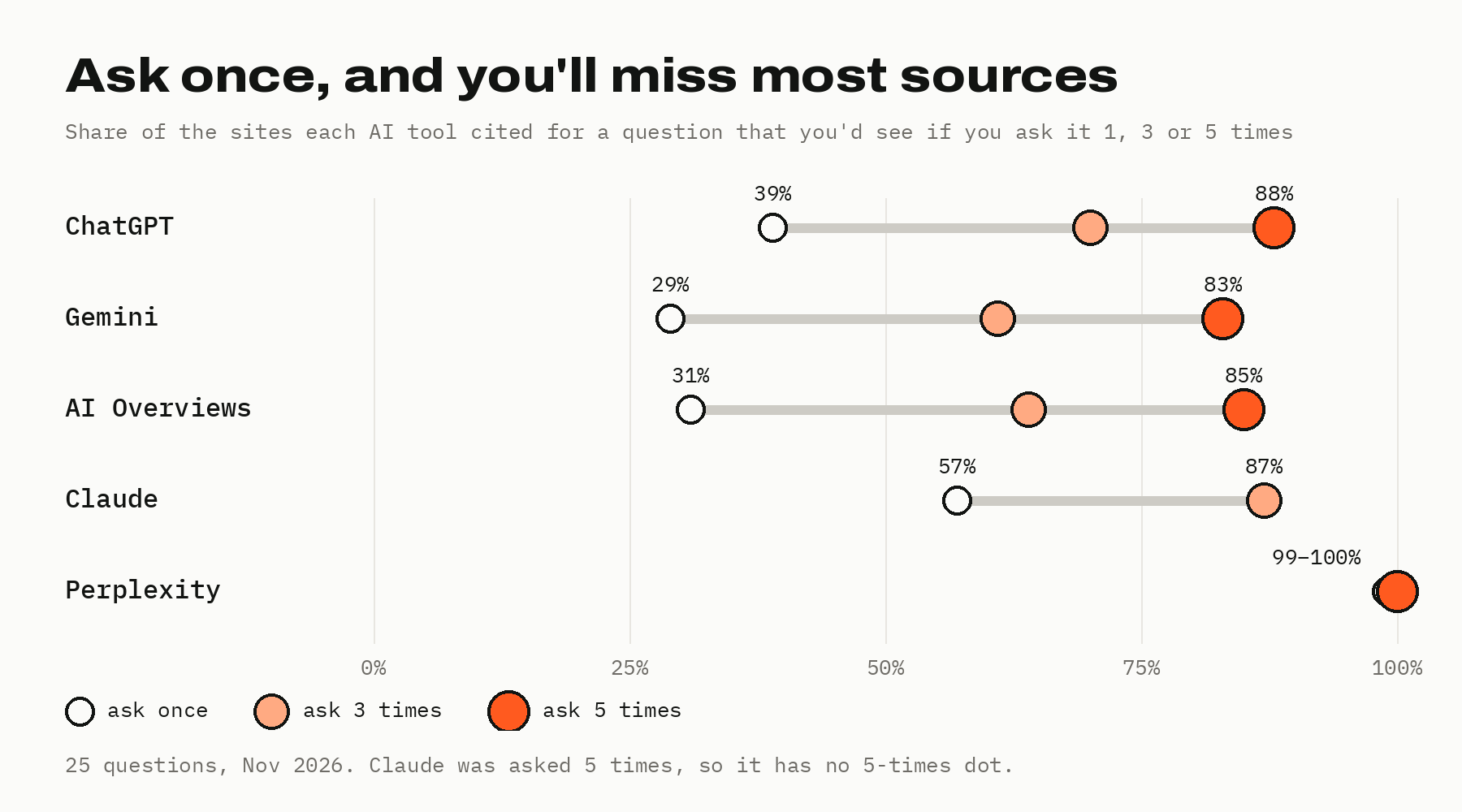
These figures come from 25 fixed questions about content work, asked in US English in November 2026. We asked each one 7 times in ChatGPT, Gemini, and AI Overviews and 5 times in Perplexity and Claude (Claude through its API, on November 19).
Before step 1, you need a list of your competitors’ domains, a private browser window, and a sheet to log answers in. Our AI citation tracking log has the columns and formulas ready.
Step 1: Pick 15–30 questions your buyers ask
Pick 15 to 30 questions that a buyer would type into an AI tool before choosing a product like yours. Our study used 25. More than 30 makes each check slow: asking 30 questions 3 times in four tools, plus once in Perplexity, is 390 answers to read.
To choose them, start from what your buyers already ask, and keep the questions where an AI answer could name you or a competitor. Then sort each one into a type: “which tool” questions (best X for Y), comparisons (X vs Y), how-to questions, “what is” questions, and pricing questions. Enter them on the Questions sheet of the log, one per row, with the type next to each. Good places to find them:
- Search Console: take the queries your pages already get impressions for and rewrite them as full questions.
- Sales and support: use the questions prospects ask on calls and in support tickets.
- Comparisons and lists: add questions such as “best project management tool for small agencies” or “Asana vs Trello”, where AI answers name competitors.
- How-to questions: add the tasks your product or content helps with, phrased the way a reader would ask.
Mix the types, because AI tools cite different kinds of pages for each. In our study, 41% of the pages cited for the 3 “which tool” questions were “best” or “top” lists, and 26% were comparisons. For the 9 how-to questions, guides made up 42% of the cited pages. If all your questions are how-to questions, you’ll learn how your guides do, but nothing about your comparison or product pages.
Keep the wording the same every time you check. If you rephrase a question, you can’t tell whether a change in the answers came from the tool or from your new wording. The list is ready when it has 15 to 30 questions and at least two types.
Step 2: Choose the AI tools to check
Check ChatGPT, Claude, Gemini, Perplexity, and Google’s AI Overviews separately, because they rarely cite the same sites. In our study, ChatGPT, Gemini, Perplexity, and AI Overviews shared at most 16% of their cited sites with each other. We haven’t measured this for Claude yet.
A good rate in one tool tells you little about another, and our guide to LLM SEO explains how each tool picks its sources. Each tool behaves differently when you ask it:
ChatGPT doesn’t always search the web. In our study, it searched in about 6 of 10 answers, and for 8 of 25 questions it never searched, however many times we asked. OpenAI says sites that block its OAI-SearchBot crawler “will not be shown in ChatGPT search answers”, so check that your robots.txt allows it before you track ChatGPT.
Claude searched the web in 57 of 125 answers in our November 19 check, so like ChatGPT, it often answers without citing anything. When it did search, it cited about 7 sites per answer. It also changed its sources less: one answer showed 57% of its sites, against 29% to 39% for ChatGPT, Gemini, and AI Overviews.
Gemini changed its sources the most in our data: only 1% of the sites it cited for a question appeared in all 7 of its answers. It also cites Reddit often, so expect forum threads among its sources.
Perplexity gave almost the same sources every time within a day. Over nine days, it still stopped citing nearly half of the sites it had cited for a question.
Google AI Overviews are checked in Google itself, with a normal search. Not every search shows one: an AI Overview appeared in 71 of our 74 searches. About 8 in 10 of the sites AI Overviews cited also ranked on Google’s first page for the same question, against under 1 in 10 for ChatGPT, as our comparison of GEO and SEO shows per tool. Check your Google rankings for the same questions alongside.
AI Mode and Microsoft Copilot weren’t part of our study. You can add them to the log the same way, but we haven’t measured how much their answers vary.
Step 3: Run each question three to five times
Ask each question at least 3 times in ChatGPT, Claude, Gemini, and AI Overviews, and 5 times for the questions that matter most. Ask it once in Perplexity. Set up every check the same way:
- A clean session: a logged-out or private browser window, so every answer starts from scratch. Our study collected ChatGPT and Gemini this way, and Claude and Perplexity through their APIs. Claude and Perplexity asked us to sign in before answering (November 2026), so use an account there and start a new chat each time.
- A new chat every time you ask, never a follow-up in the same conversation.
- The same country and language every time, so one check compares fairly with the next.
- The same day for every question in a check, so the differences you see come from the answers themselves, not from time passing.
Count the answers before you start, because that number is your time estimate. Asking 20 questions 3 times in four tools and once in Perplexity is 260 answers per check. Time your first 10 answers and multiply to see how long a full check takes you.
A team of one can start with 10 questions and add more once the routine works.
Step 4: Log every answer in a sheet
Log one row for every answer, in the same sheet every time you check. Our free AI citation tracking log has these columns, with dropdowns for the tool, the question, and the yes or no fields:
- Date, check number, tool, question, and answer number: enter these for every row, so you can compare checks later.
- Searched: enter “yes” if the answer showed any sources and “no” if it didn’t. A “no” still gets its own row.
- Our site cited: enter “yes” if any source in the answer is a page on your site.
- Our URLs cited: paste the full address of every page of yours the answer linked, not just the domain. Two of your pages can win the same question, and only the URL tells you which one.
- Brand named without a link: enter “yes” if the answer names your brand but doesn’t link your site.
- Competitors cited and all cited domains: list the sites the answer linked, so you can see who won the question.
Copy each cited address exactly as the answer shows it. Tracking parameters and redirects can make two addresses look different when they’re the same page, so clean them up only after you’ve saved the original.
Step 5: Calculate your citation rate
Your citation rate for each tool is the number of answers that cite your site, divided by the number of answers you logged, times 100. Count the answers with no sources too: if ChatGPT answers without searching, that answer still didn’t cite you.
For example, imagine a team asking 20 questions 3 times each in ChatGPT:
| Answers logged | Answers citing the site | Citation rate | |
|---|---|---|---|
| Your site | 60 | 12 | 20% |
| Competitor A | 60 | 21 | 35% |
| Competitor B | 60 | 6 | 10% |
Work out the same rate for two or three competitors on the same answers, because a rate on its own doesn’t say whether 20% is good for your topic. Then calculate it per question: the questions where a competitor is cited and you aren’t are your work list. The Rates sheet in the template does both calculations for every tool.
Step 6: Act on what gets cited
Start with the questions where a competitor is cited and you aren’t, and read the page that won:
- Read the cited passage, not just the title. Find the paragraph on the cited page that matches what the answer says, and compare it with what your page says on the same point.
- Match the page type to the question. If the tools cite lists for a “which tool” question and you only have a product page, a researched list is the gap.
- Decide whether the page belongs on your site. In our study, AI Overviews often cited YouTube and Reddit, and Gemini cited Reddit, while ChatGPT, Claude, and Perplexity cited neither. When videos or threads win a question, a new article on your site may not be the answer, and our guide to GEO for content teams covers that off-site work.
- Report the rate next to Google rankings, not instead of them. When an AI Overview stops citing you, check your Google ranking for the same question first, since most sites AI Overviews cited also ranked on the first page.
What wins also differs by tool: most sites AI Overviews cited ranked on Google’s first page, while under 1 in 10 of ChatGPT’s did. Our guide to LLM SEO covers what to change for each tool.
Step 7: Re-check weekly, then monthly
Re-check every week for the first month, then once a month. AI citations change over days, not just from one answer to the next. In our study, ChatGPT, Gemini, Perplexity, and AI Overviews each stopped citing 42% to 68% of the sites they had cited for a question within nine days. We haven’t tracked Claude over time yet.
Weekly checks at the start show you how fast your own questions change. After that, monthly checks take a quarter of the time but miss changes within the month, so add an extra check whenever you publish or update a page you track.
Compare each check with the one before, and keep everything else the same: the questions, their wording, the tools, how many times you ask, and the browser setup.
When is a paid tracking tool worth it?
A paid tracking tool is worth it when one check grows into hundreds of answers that you’d repeat every month. For example, asking 40 questions 5 times in ChatGPT, Claude, Gemini, and AI Overviews is 800 answers per check. A small script that collects answers through an API is the step between, if a developer or technical SEO on the team can maintain it.
Before you buy, check these points against your method:
- Answers per question: ask how many times the tool asks each question, since one answer misses most of what ChatGPT, Gemini, and AI Overviews cite, and almost half of what Claude cites.
- Tools and modes: check which AI tools it covers, and whether it collects logged-out answers, API answers, or something else.
- Cited URLs: make sure you can export the full cited addresses, not just a visibility score.
- Competitors: check that it shows competitors’ citations on the same questions.
- Your questions: make sure you can track your own fixed questions, not only the ones the tool suggests.
Does Search Console show clicks from AI Overviews?
Yes, Search Console counts clicks from AI Overviews and AI Mode, but it doesn’t separate them from other Google results. Google says sites in its AI features are included in the overall search traffic and reported in the Performance report under the Web search type. You can see that a page got clicks, but not whether they came from an AI Overview, which is why tracking the answers themselves still matters.
Does ChatGPT’s Business Hub replace citation tracking?
No, ChatGPT’s Business Hub doesn’t replace citation tracking, but it adds data that question tracking can’t get. OpenAI launched Business Hub in beta on November 10, 2026. It shows a business its mentions, website clicks, and discovery topics in ChatGPT over the past 28 days. Discovery topics are the common themes of the conversations where ChatGPT cited the business’s website.
OpenAI’s help page says a Business Hub mention counts only when ChatGPT references the business’s website, so naming the brand alone doesn’t count. That makes it closer to what this page calls a citation.
Business Hub groups conversations into themes rather than the prompts people typed, and its tooltip says recorded clicks don’t confirm website visits or conversions. Use it to see the overall trend, and your own questions to see where you win or lose and to whom.
Can you see ChatGPT traffic in your analytics?
Yes, you can see visits from ChatGPT in analytics tools such as Google Analytics. OpenAI says ChatGPT adds utm_source=chatgpt.com to referral links, so those visits show up under that source.
A visit shows that someone clicked a link to your site, not which question or answer it came from. A citation doesn’t mean a visit, so measure traffic and your citation rate as separate numbers.
Do you need to track AI Mode separately?
Yes, track AI Mode separately if your buyers use it, because Google lists it as a separate AI feature from AI Overviews. Our study didn’t include AI Mode, so we have no data on how much its citations vary. Add it to your log as another tool with the same questions. Start by asking each question 3 times, and see how much the answers change before you settle on a number.